The AI support engine built for Help Scout.
ReplyScout analyzes every incoming ticket, gathers context from 10+ sources, and drafts a reply your agent can review and send. It learns from your team's corrections and gets smarter every day.
7-day free trial. Credit card required.
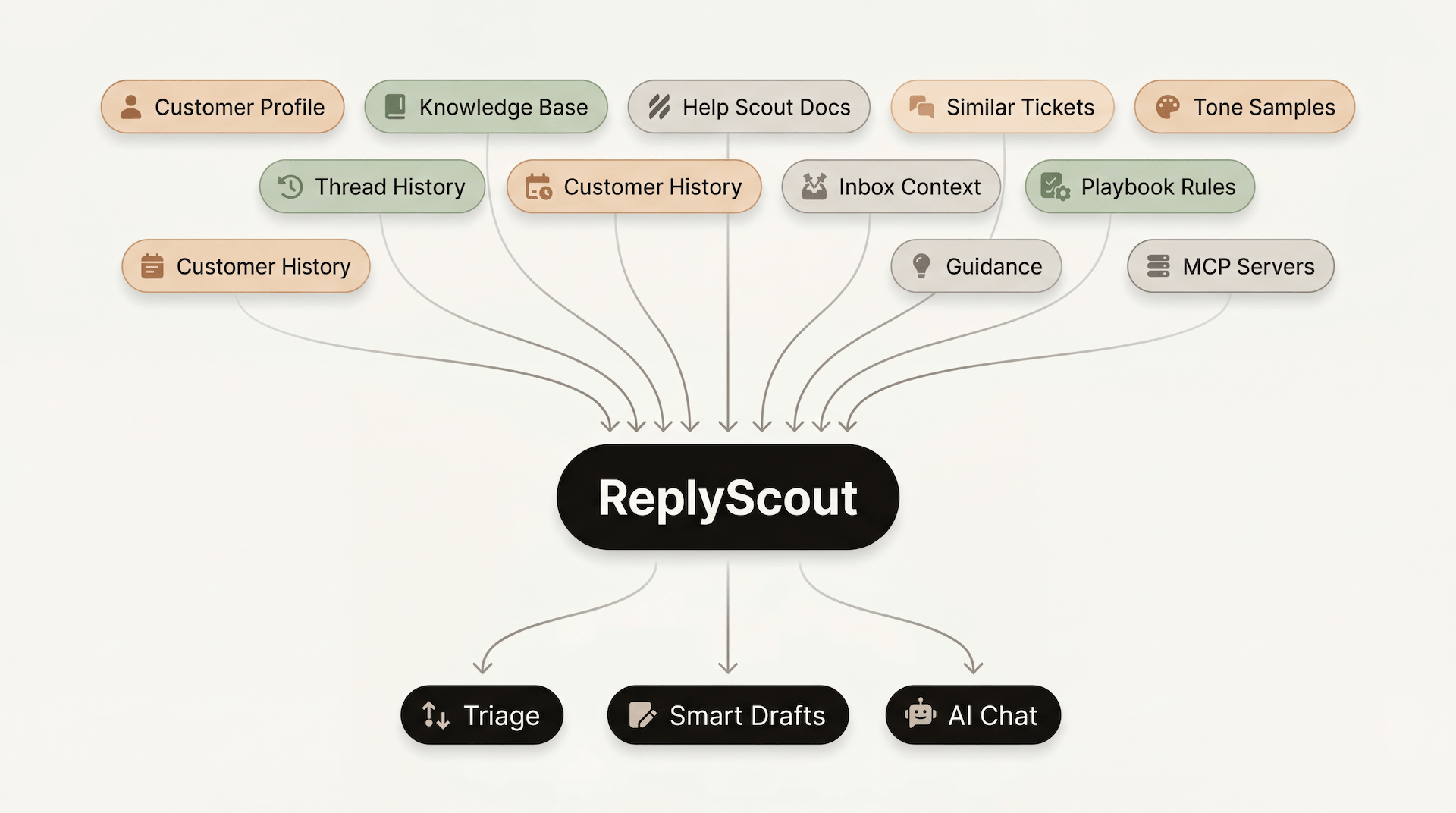
We don't replace Help Scout. We empower it.
If you wish Help Scout had more AI capabilities, ReplyScout is for you. It's built from the ground up for Help Scout, so it works where your team already works.
Automatic triage with Playbooks — ReplyScout can classify, tag, assign, close, or do anything else you want to do depending on your scenario.
Automated AI Drafts (that actually sound like your team) — ReplyScout gathers context from 10+ sources, so every draft is specific, accurate, and on-brand.
An AI chat assistant inside your dashboard — Talk to ReplyScout directly from Help Scout.
Continuous learning — ReplyScout learns from your team's corrections and gets smarter every day.
Frontier AI models — Choose from the latest models: OpenAI GPT-5.4, Gemini 3.1 Pro Preview, Claude Opus 4.6
Your agents spend minutes per ticket on work ReplyScout handles in seconds.
Reading, classifying, searching for context, drafting from scratch — every ticket, every time. Here's how ReplyScout takes over.
A ticket arrives. ReplyScout reads the message and classifies the customer's intent against your Playbook rules. Spam, thank-you messages, and conversations that do not need a reply are handled automatically.
ReplyScout searches your knowledge base, past tickets, customer history, and your team's guidance rules — gathering everything it needs to write an accurate reply.
A complete reply is generated and saved as a draft directly in Help Scout. It matches your team's writing style, cites your documentation, and follows your Playbook instructions.
Your agent opens Help Scout, sees the draft, makes any edits, and sends. ReplyScout never contacts customers directly.
Every ticket classified and routed in seconds.
Define how your team handles each scenario once.
Every incoming ticket gets classified, tagged, routed, and drafted - before an agent opens it.
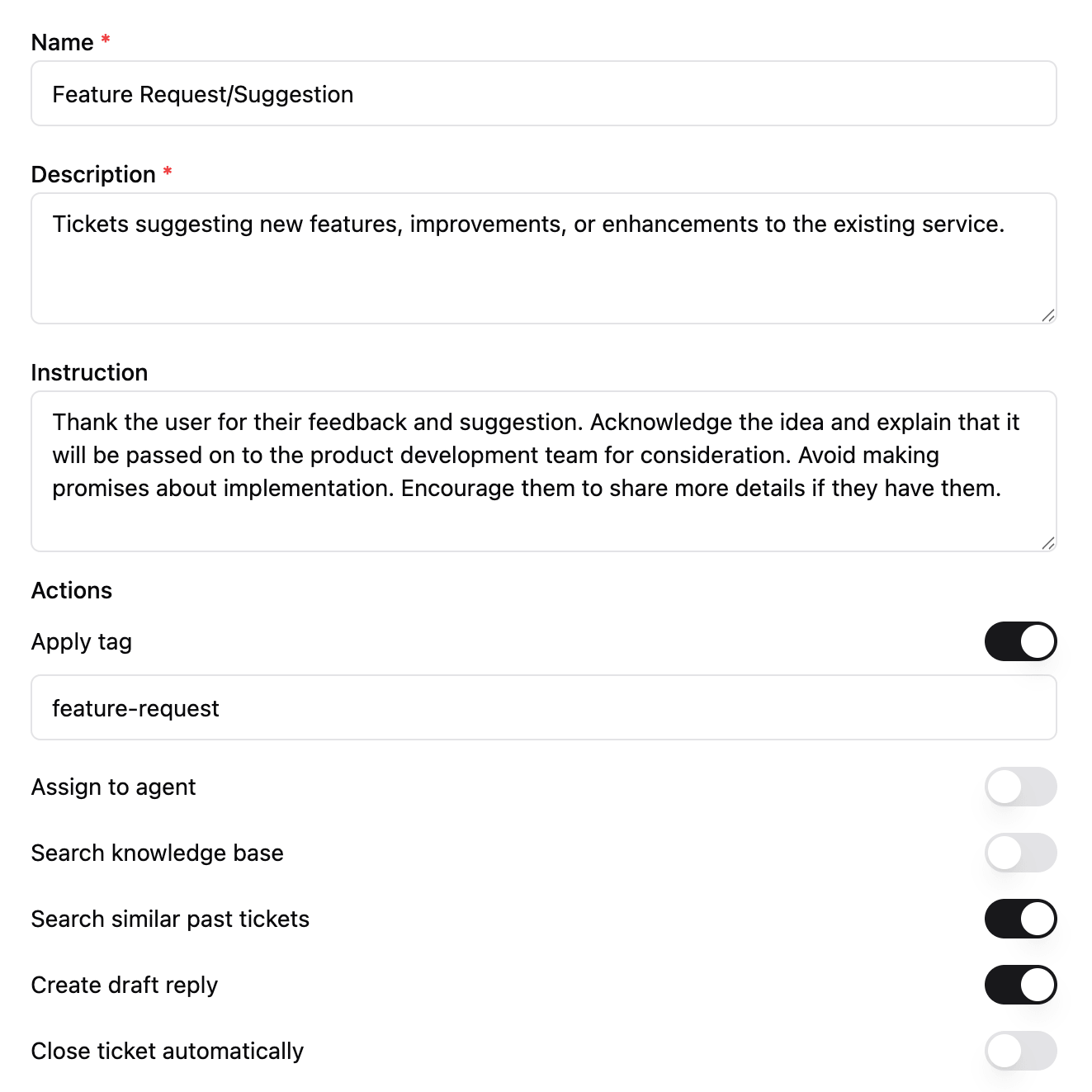
What Playbooks can do
Classify customer intent
ReplyScout reads the message and matches it to the right Playbook automatically.
Generate a draft reply
With custom instructions per ticket type so billing questions get a different tone than technical issues.
Auto-tag, auto-assign, and auto-close
Keep reporting clean and tickets routed to the right people.
Search your knowledge base and past tickets
Toggle per Playbook. Technical questions pull from docs; account questions skip them.
Pull data from external systems
Connect your CRM, billing system, or inventory directly into the draft.
Drafts that actually sound like your team.
Every draft pulls from your docs, past tickets, customer history, company information, team guidance, MCP servers, etc... so agents review instead of research. Most drafts are ready to send as-is.
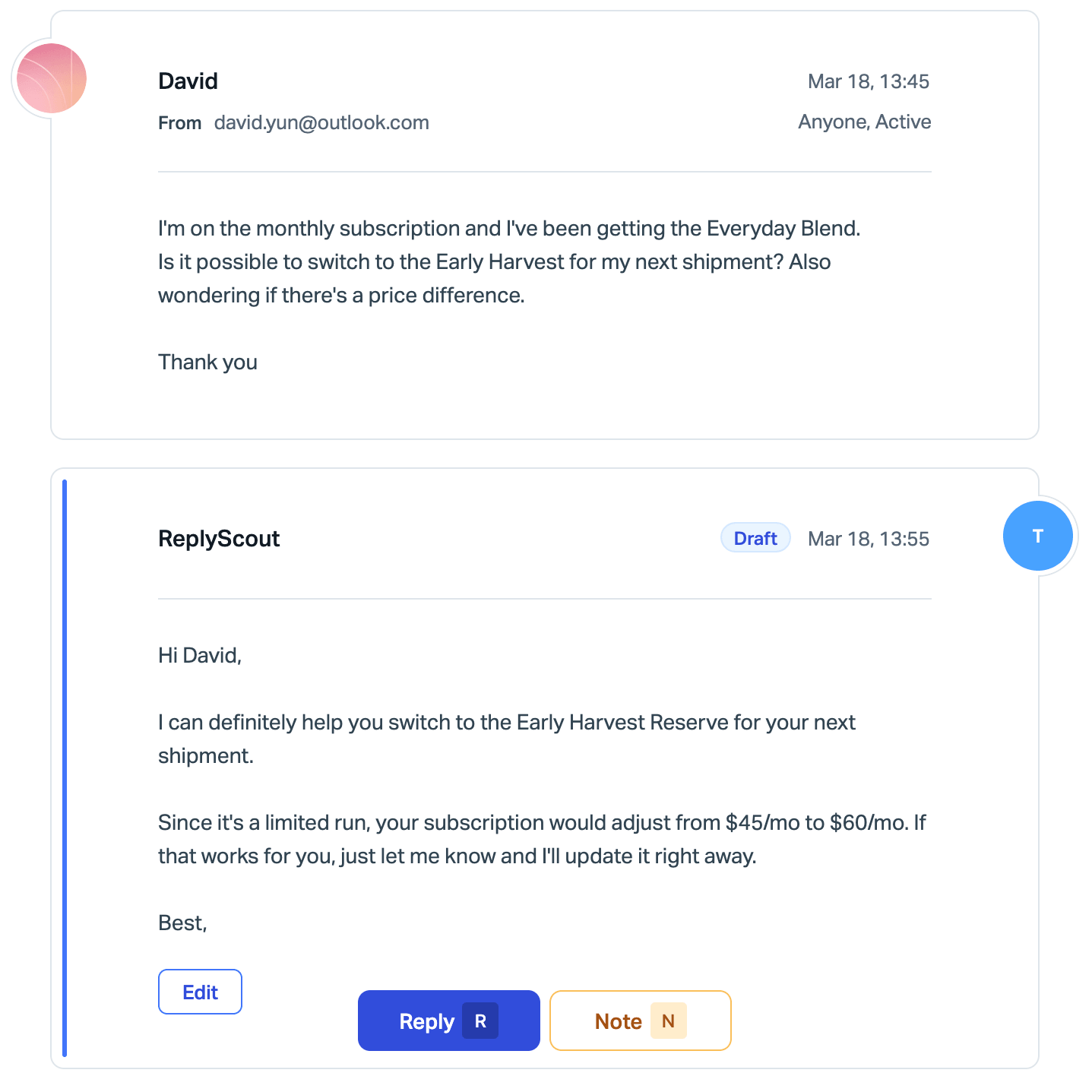
What powers every draft
1. Your Knowledge Base
Docs, articles, and FAQs. Answers cite your own sources with links. ReplyScout never makes up policy or product details.
2. Ticket Memory
Six months of your resolved conversations, searchable by meaning. ReplyScout finds the most similar past issues and drafts replies consistent with how your team actually handles things.
3. Your Team's Voice
Recent agent replies analyzed for tone, greetings, sign-offs, and formality. The draft matches your style, not a generic AI voice.
4. Company Context
Your product information, policies, and custom guidelines. The rules ReplyScout follows for every reply.
5. Customer History
Previous conversations with this specific customer. ReplyScout knows what they asked before, how it was resolved, and whether they are new or long-time.
6. Team Guidance
Rules and corrections from your team. Factual corrections, process rules, tone preferences. The most recent entries always take priority.
AI Chat right inside Help Scout.
Agents ask questions, refine drafts, and look up customer details without leaving Help Scout. All of ReplyScout's context, one chat away.
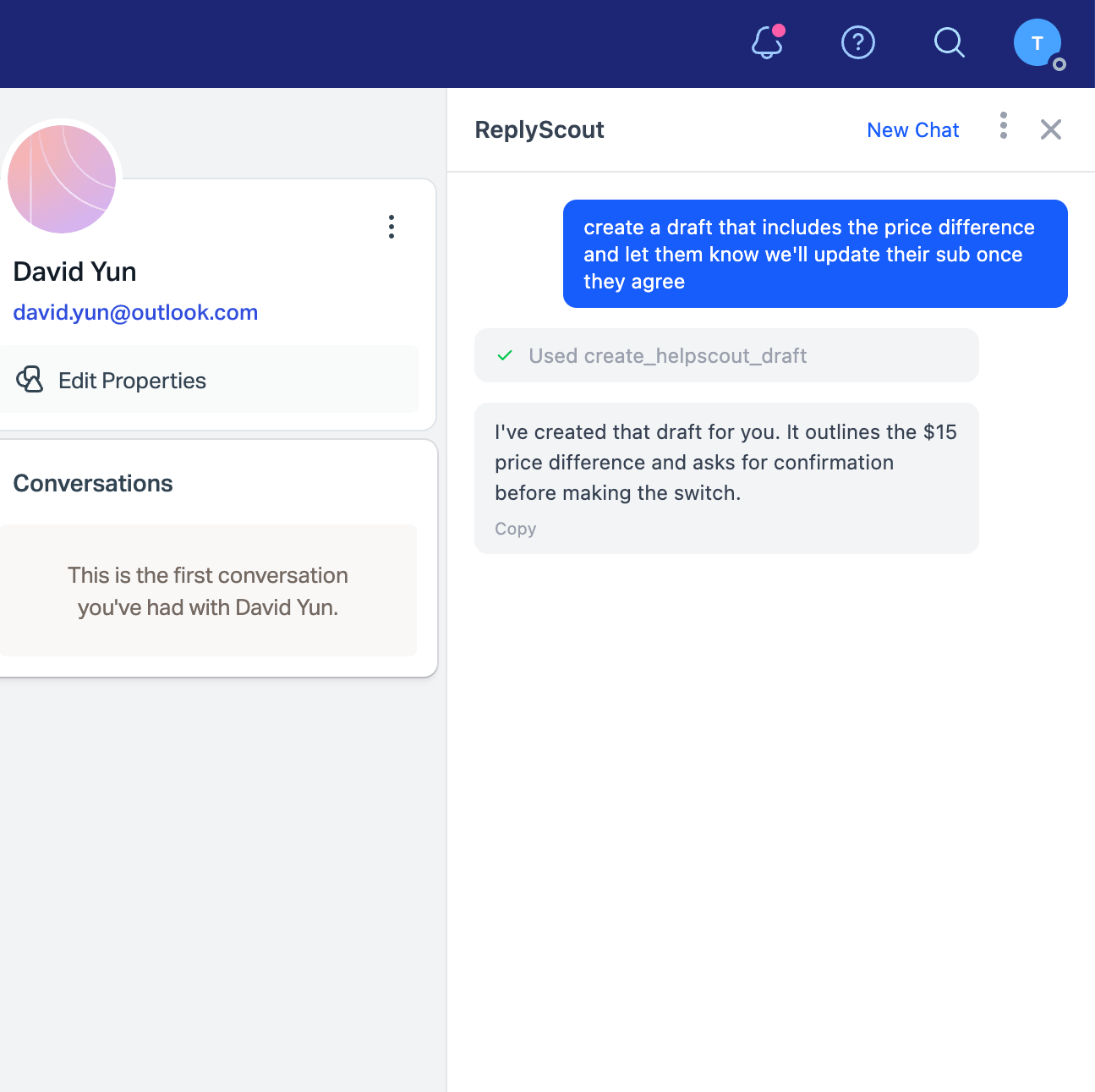
What AI Chat can do
Refine a Draft
"Make this shorter" or "Add the refund policy link" and ReplyScout updates the draft.
Ask Questions
"What did we tell this customer last time?" or "What's our policy on extended trials?"
Get More Context
"Find similar tickets about API rate limits."
Look Up External Data
Connected tools let agents check order status or account details mid-conversation.
ReplyScout gets smarter every day.
When agents edit a draft before sending, ReplyScout detects the change and learns from it. Your team can also add manual rules at any time. The longer you use it, the better it gets.
How Guidance works
Automatic Learning
When an agent edits a draft before sending, ReplyScout detects the change and extracts a Guidance rule. Factual corrections, process updates, and tone preferences are captured automatically.
Manual Rules
Your team can add rules directly — factual corrections, process rules, tone preferences. Senior agents' knowledge gets baked into every future draft, even for new hires.
Simple pricing
Every plan includes all the best features.
Single Inbox
$150/mo
Get started with ReplyScout.
500 conversations/mo (then $0.25/ea)
1 mailbox
10 active playbooks
6 months of draft context
AI draft replies
Automated triage
Knowledge base
Connect your MCP tools
Multi Inbox
$350/mo
Everything in Single Inbox, plus:
1,500 conversations/mo (then $0.20/ea)
Unlimited mailboxes
Unlimited playbooks
24 months of draft context
Priority support
Frequently asked questions
No. Every reply is saved as a draft in Help Scout. Your agent reviews, edits if needed, and sends. ReplyScout never contacts customers directly.
ReplyScout adds three things: automatic triage with Playbooks (classify, tag, assign, close), AI Drafts built from 10+ context sources including your past tickets and knowledge base, and AI Chat inside Help Scout via a Chrome extension. Plus a Guidance system that learns from your team's corrections over time.
Every conversation that comes in while ReplyScout is active counts as one conversation. If ReplyScout takes any action on it, that's one conversation, no matter how many actions it performs. Conversations that ReplyScout doesn't process aren't counted.
ReplyScout works with the latest frontier models from OpenAI, Google, Anthropic, and more. We always use the best models available.
About five minutes. Connect Help Scout via OAuth, enable your inboxes, and either create Playbooks manually or let ReplyScout auto-generate them from your conversation history. Drafts start appearing on the next incoming ticket.
Yes. ReplyScout runs on Cloudflare's global infrastructure with encrypted storage, verified webhooks, and full account isolation. Your data is never used to train AI models.
Yes, on the Multi Inbox plan ($350/mo). Each inbox gets its own Playbooks, Ticket Memory, Guidance, and knowledge base. Context from one inbox never bleeds into another.
Agents review every draft before sending. When they edit a draft, ReplyScout detects the change and improves future replies. Your team can also add manual Guidance rules at any time.
Yes. ReplyScout syncs your Help Scout Docs articles, searches them when drafting, and cites them with titles and links.
Two plans: Single Inbox at $150/month and Multi Inbox at $350/month. No per-agent fees — your whole team gets access.
Let ReplyScout handle the tedious work.
Triage. AI Drafts. AI Chat inside Help Scout. A system that gets smarter every day.